
After years of helping executives, founders and marketing leaders shape how they show up in the world, I realized we were answering the same LinkedIn questions again and again. So we made the resource I wished we could simply send every client: what belongs where, when to post, how to design for the feed, what the algorithm actually knows, and which LinkedIn ‘rules’ are worth ignoring.
LinkedIn has become one of the places where leadership, expertise, reputation and brand intersect. The questions we hear aren't usually about how to use the platform. They're questions of judgment: Should this be a post or an article? Should it come from me or the company? How often should I post? Is Tuesday morning really better? Should I share someone else's post? Tag the client? Ask my team to engage? And why did the thoughtful post get fewer likes than the one I wrote in five minutes?
This is our answer, at least for now. We're calling it the Q3 2026 Edition deliberately. Platforms change, algorithms evolve, and good advice should be willing to evolve with them.
SHOWING UP
First, decide where the idea belongs
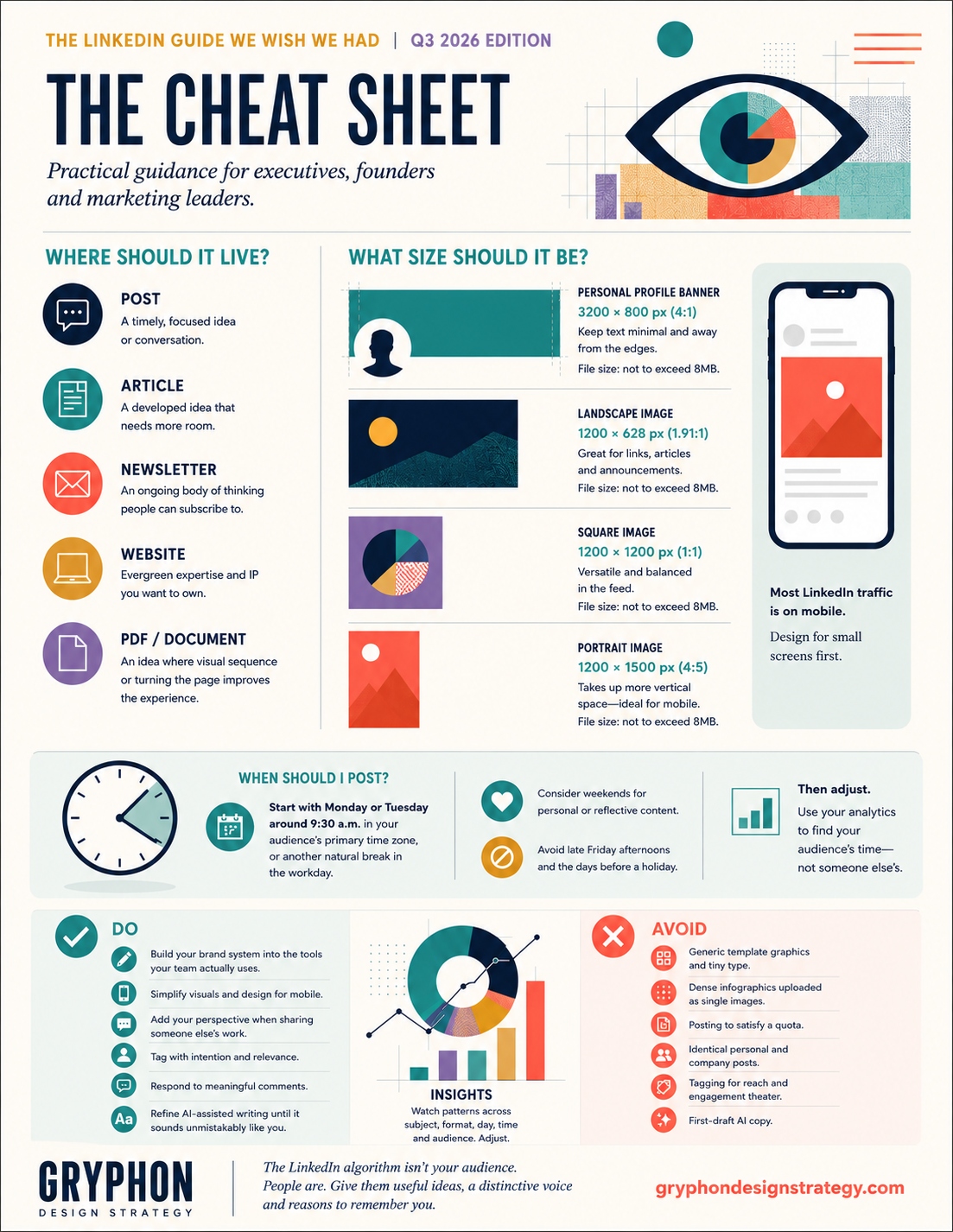
Not every idea belongs on LinkedIn, and not everything that belongs on LinkedIn belongs in a post.
A post is the conversation layer. Use it for a focused observation, timely perspective, project lesson, announcement with context, or an idea you want to put into circulation. LinkedIn currently limits posts to 3,000 characters.
An article gives an idea more room. It is better suited to developed arguments, substantive expertise and thinking that benefits from depth. LinkedIn currently allows articles up to 125,000 characters.
A newsletter makes sense when that thinking becomes an ongoing editorial commitment rather than a standalone idea. Readers can subscribe and receive notifications when new editions are published.
And sometimes the best answer is your own website. If you've created meaningful intellectual property - original research, a Resource, an evergreen Insight or a perspective you want associated with your organization over time - we generally prefer giving it a permanent home on a platform you own. LinkedIn can introduce the idea and bring people to it.
A useful shorthand is: Post for conversation. Article for depth. Newsletter for continuity. Your website for ideas you want to own.
Personal profile or company page?
A distinction I find useful is: if the value is the perspective, start with the person. If the value is the organization, start with the company.
A founder interpreting a shift in the market, a CMO reflecting on a transformation, or an executive sharing something learned through experience will often be more compelling from a personal profile. A new Resource, case study, company announcement, research release or organizational milestone may naturally begin with the company.
On my own LinkedIn, thought leadership generally begins with my personal profile because the perspective is mine. Gryphon may amplify that thinking when it's relevant to the firm. Conversely, a new Gryphon Resource or case study naturally begins with Gryphon; I might then share it personally with the context only I can provide.
I generally don't recommend publishing identical copy in both places. Adapt rather than duplicate. The second voice should contribute something the first couldn't.
Your banner is part of the introduction
The banner is one of the largest pieces of visual real estate on a LinkedIn profile, yet it's often treated as an afterthought. Use it to reinforce something meaningful: the organization you lead, the field you're shaping, your expertise, your visual identity, or simply a distinctive sense of who you are professionally.
LinkedIn currently recommends a 1584 x 396 px background image for personal profiles. Because the composition changes across screen sizes and the profile photograph overlaps the banner, we generally avoid putting essential text there. If you do use words, keep them minimal and well away from vulnerable areas. The image should still work when the crop changes.
The same principle applies to company banners: treat the space as brand expression rather than a billboard that needs to contain the entire positioning statement.
Design for the feed, not the artboard
A visual gives the eye somewhere to land, but it should still look unmistakably like your organization. We're not fans of the generic Canva-card aesthetic, but Canva itself isn't the problem. If it's part of your team's workflow, build your brand kit first - typography, colors, logo usage, image treatment and a small system of templates - so the efficiency of the tool doesn't come at the expense of your identity.
We also favor portrait imagery when the content supports it. A 4:5 image occupies more vertical real estate in the feed, particularly on a phone, giving a strong visual more room to be noticed. Design with that smaller screen in mind: dense infographics and presentation-sized diagrams that look beautiful on your monitor can quickly become illegible in-feed. When the information is complex, pull out the strongest visual idea for the post and give the complete story somewhere it has room to breathe.
In one controlled study involving 1,036 responses, people viewing research presented as infographics answered 65.8% of comprehension and recall questions correctly versus 42% for text-based presentations - roughly 1.5 times the correct-response rate. That isn't a LinkedIn performance statistic, but it is useful evidence for something designers have long understood: visual structure can make complex information easier to absorb and remember.
The goal isn't to decorate the post. It's to make the idea easier to see.
BEING SEEN
What does “the algorithm” actually want?
Probably not one specific posting time, number of hashtags or clever formatting trick.
LinkedIn's current Feed uses sophisticated recommendation systems to understand both what a post is about and who is likely to find it relevant. In 2026, LinkedIn described a next-generation ranking system powered by LLMs and transformer AI models. Its systems evaluate signals including professional profile information, network relationships and historical behavior - what people read, like, comment on, return to or simply scroll past.
That suggests a more useful question than How do I beat the algorithm? How do I become consistently relevant to the people I want to reach?
Develop recognizable areas of expertise. Publish useful thinking around them. Create content worth spending time with. Participate in genuine conversations. Over time, you're giving both people and the platform increasingly clear evidence about what you know and who finds it valuable.
Likes aren't the whole story
LinkedIn has also disclosed something particularly relevant to executive audiences: its Feed systems consider dwell time and passive consumption, not only visible reactions. Someone can stop, read and find a post valuable without ever clicking Like.
Think about your own behavior. An investor may read without commenting. A prospective client may remember your name without reacting. A candidate may send your post privately to a colleague. Visible engagement is useful information, but it isn't a complete measure of influence.
Don't confuse the applause you can see with the attention you can't.
When should I post?
There are plenty of agencies willing to give you a magic number. We're not one of them - but we do have a starting point.
For a professional B2B audience, we generally begin with Monday or Tuesday morning around 9:30 a.m. in the audience's primary time zone, or another natural break in the workday. More personal or reflective material may work well on weekends, while important business content is usually better kept away from late Friday afternoons and the days immediately before a holiday.
From there, pay attention to what your own audience tells you. If another day, time or type of content consistently performs better with the people you actually want to reach, adjust accordingly. LinkedIn provides analytics for both personal content and Company Pages, so there is no reason to rely indefinitely on someone else's averages.
The point isn't finding the best time. It's finding your audience's time.
How often should I post?
For senior leaders, we generally recommend one or two substantive posts a week over daily content created simply to satisfy a calendar. Some people have enough relevant observations to contribute more frequently; others are more valuable when they publish less often and have something substantial to add.
Consistency matters because you're gradually building a body of thought leadership. Someone encountering you for the first time should be able to look at your recent activity and begin to understand what you know, what you notice and what you care about.
What should senior leaders actually talk about?
The strongest executive content usually begins with the work, not the content calendar. What are you noticing that others may not see yet? What has experience changed your mind about? What question keeps appearing in leadership meetings? What decision was harder than it looked? What are customers telling you? Where does conventional wisdom deserve more nuance?
Expertise becomes interesting when it contains judgment. You don't need to explain everything you know. Give people access to how you think.
What size should my image cards be?
- Personal profile banner: 1584 x 396 px
- Landscape image: 1200 x 628 px
- Square image: 1200 x 1200 px
- Portrait image: 4:5; 720 x 900 px or larger at the same ratio
LinkedIn supports landscape, square and vertical image formats; specifications can change, so check LinkedIn's current guidance before creating a large production system around them.
What about PDFs?
We like document posts when the format itself improves the communication. Think of a beautifully designed art-direction presentation, a concise framework, a visual sequence, research highlights or a short field guide. Each page should give the reader a reason to continue. That's different from taking an article, arbitrarily chopping it into slides and calling it a carousel.
Our rule is simple: use a PDF when turning the page is part of the experience. We'll save the deeper guidance on designing document posts for another Resource.
PLAYING WELL WITH OTHERS
Sharing someone else's content
An industry article, new research, client announcement, colleague's perspective or report you genuinely found useful may be worth sharing. But tell people why. What caught your attention? Where do you agree? What would you add? Why should someone in your network spend time with it?
The commentary is what turns a repost into a contribution. The same applies when a company shares an executive's post or an executive shares company content. Don't simply create an echo. Add context.
Tagging, commenting and engagement etiquette
Tag someone when they are genuinely part of the story: they contributed to the work, authored the research, participated in the event or would reasonably want to know they've been mentioned.
The same restraint should guide internal amplification. It's entirely appropriate to make employees, partners and collaborators aware that meaningful content has been published, particularly when they helped create it or the subject is relevant to their networks. What we would avoid is prescriptive engagement - scripted comments, coordinated reactions or participation requested primarily to influence distribution.
When someone leaves a substantive comment, respond substantively. A thoughtful comment is an opportunity to extend the idea, answer a question or begin a professional relationship. You don't need to manufacture conversation, but if someone starts one, participate in it.
And liking your own post? You can. We simply don't consider it a meaningful visibility strategy.
AI can help. Don't let it erase you.
We use AI. It's extraordinarily useful for research, synthesis, exploration, editing and getting beyond the blank page. But your communication style is part of your brand identity just as surely as your logo, typography and visual system.
Use AI to help find the thought, challenge the argument or refine the writing. Then make it yours. Remove language you would never say. Add the experience only you possess. Read it aloud. The danger isn't that AI makes everyone less articulate. It's that it can make everyone sound equally articulate.
DO'S & DON'TS
Do
Build your brand system into the tools your team actually uses. Give strong visuals enough space. Design for a phone as well as a monitor. Add useful alt text. Add perspective when sharing someone else's work. Tag with intention. Respond to meaningful comments. Adapt company and executive content rather than duplicating it. Refine AI-assisted writing until it sounds unmistakably like you.
Avoid
Generic template graphics. Tiny text. Dense infographics uploaded as single images. Posting to satisfy a quota. Context-free reposts. Identical personal and company posts. Tagging for reach. Manufactured engagement. First-draft AI copy.
And before publishing, ask one last question: Would the person I'm trying to reach actually find this worth their time?
If the answer is yes, you're probably ready.
FIELD NOTES
The LinkedIn algorithm isn't your audience. People are. Rather than trying to trick the system, give it better evidence: useful ideas, recognizable expertise, a distinctive voice and genuine professional conversations.
About Gryphon Design Strategy
Gryphon Design Strategy is a women-led creative studio helping organizations build clearer, more meaningful brands and experiences through strategy, brand identity, websites, marketing communications and creative partnership. We work across healthcare, technology, consumer products, innovation and organizations navigating growth or change - bringing research, design and human perspective together to help important ideas become easier to understand, find and trust.
SOURCES & REFERENCES
- LinkedIn Help - Differences between posting updates and publishing articles
- LinkedIn Engineering - Engineering the next generation of LinkedIn’s Feed
- LinkedIn Engineering - Leveraging dwell time to improve member experiences
- LinkedIn Help - Post analytics for your content
- LinkedIn Help - Analytics for LinkedIn members
- LinkedIn Help - Image specifications for LinkedIn Pages
- LinkedIn Help - Add or change the cover image on your profile
- LinkedIn Help - Schedule a LinkedIn Page post
- Hughes et al. - Infographics Improve Comprehension and Recall at the Orthopaedic Journal Club